


Cimagrafi 26
From idea to finished part. Know the cost. Lower it. Win the job.
For 35 years, designers and machine shops have used Cimagrafi to turn an idea into a finished part. Version 26 adds what a shop needs now: it knows what a job will cost before the first chip is cut, quotes it with an AI assistant, and finds a cheaper way to cut it with the tools already on the shelf.
The financial approach
Most CAM systems stop at the toolpath and leave the price to a spreadsheet. Cimagrafi carries on. The model that plans the cut also prices it, so the choice of cutter, machine and material is made in money, and held to the finish the customer asked for.
- Measure. Machine time comes from the real toolpath: every cut, plunge, rapid and tool change, at that machine's speeds.
- Price. Material, machine time, labour, overhead and tool wear come from your rates. Then markup, minimum order and currency.
- Optimize. Mill tries faster ways to cut and keeps only those that still hold the finish, using cutters you already own.
- Decide. Compare machines, materials and cutters before you accept the job.
On one logo-engraving job, Optimize Job took the cycle from 17.8 minutes to 4.3 (about 76 percent less) and the cost per part from 50.11 to 27.40 USD (about 45 percent less). Seven levers were tried, and each one was held to the promised finish. A missing price is named, never counted as zero. Your own savings depend on how far current cutting values are from what the material and the cutter allow.
Know the price before you cut — just ask
Every module has an AI Assistant docked beside the work. You describe the task in your own words. It runs the same commands you would use, then shows the result on screen. Nothing changes until you see it. One sentence replaces a string of menu clicks, and a new user can quote a job without learning every command first.
- Is this job ready to quote? The assistant lists every missing cost fact, a machine rate, a material price or an unpriced cutter, and the page where you fill it in.
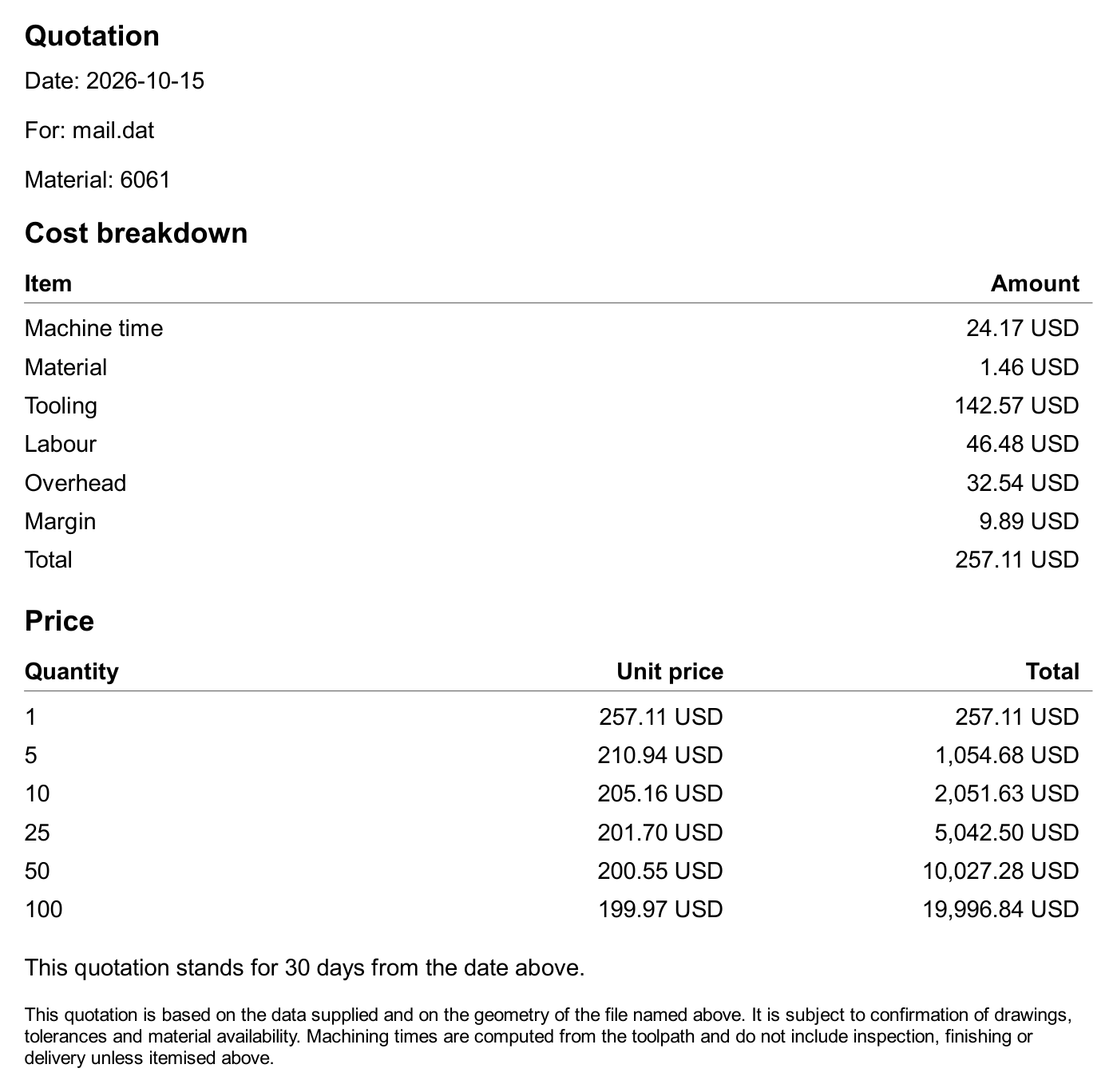
- Quote 1, 10 and 50 parts in euros. Each quantity is priced from the measured toolpath and your rates. The price per part falls only as the setup is shared.
- Where does this price come from? Every line is named: measured from the toolpath, taken from a library, or entered by you.
- Write the quotation letter. A PDF with the cost breakdown, the price breaks and the validity date.
Rates, machines, materials and tool prices live in one Financial Center. A readiness check points at anything missing and opens that page. The cost of the job sits in the status bar and updates as you work. The assistant never fills a gap with a guess.
Cut for less
Optimize Job tries the alternatives on the real toolpath, prices each one the way the quotation would, and keeps only those that still deliver the finish. A finish stepover placed on the finish target, fewer depth levels, wider roughing, better feeds and speeds, a spiral instead of a parallel pattern, or a bigger cutter that still reaches every corner. Each suggestion shows the minutes, the money and the effect on the finish before you accept it.
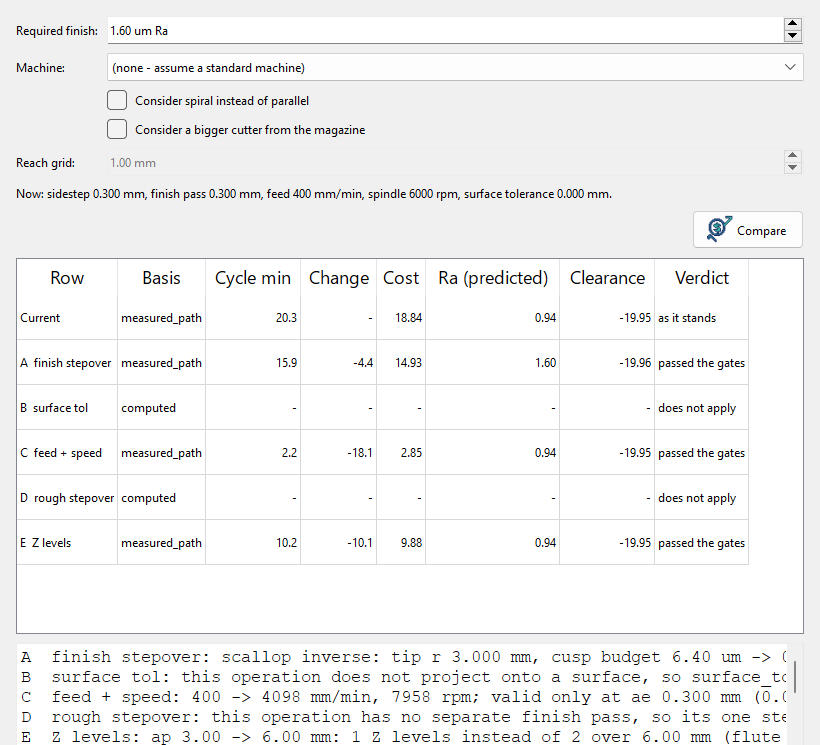
Chip-thinning compensation raises the feed on light passes, where a naive feed rubs instead of cutting. When only spindle power stops a deeper cut, Mill offers the full depth at a feed the spindle can drive. Dynamic feeds rise and fall with the real load along the path.
Tool Plan looks at every cutter in the magazine and estimates the best one for each operation. A different cutter is accepted only where it still reaches what the current one reached. Tool wear is a cost per minute, from price, regrinds and life in that material, so a fast setting that burns tools can lose to a slower one. A cutter with no price is shown, and never picked.
Compare Machines prices the job on every machine in the shop, cheapest first, on a copy of the job re-advised for that spindle, power and rigidity. Each material carries its price, density, cutting data and the finish it can hold, so Mill can say before you accept the job whether the customer's finish can be held.
One suite, ask in every module
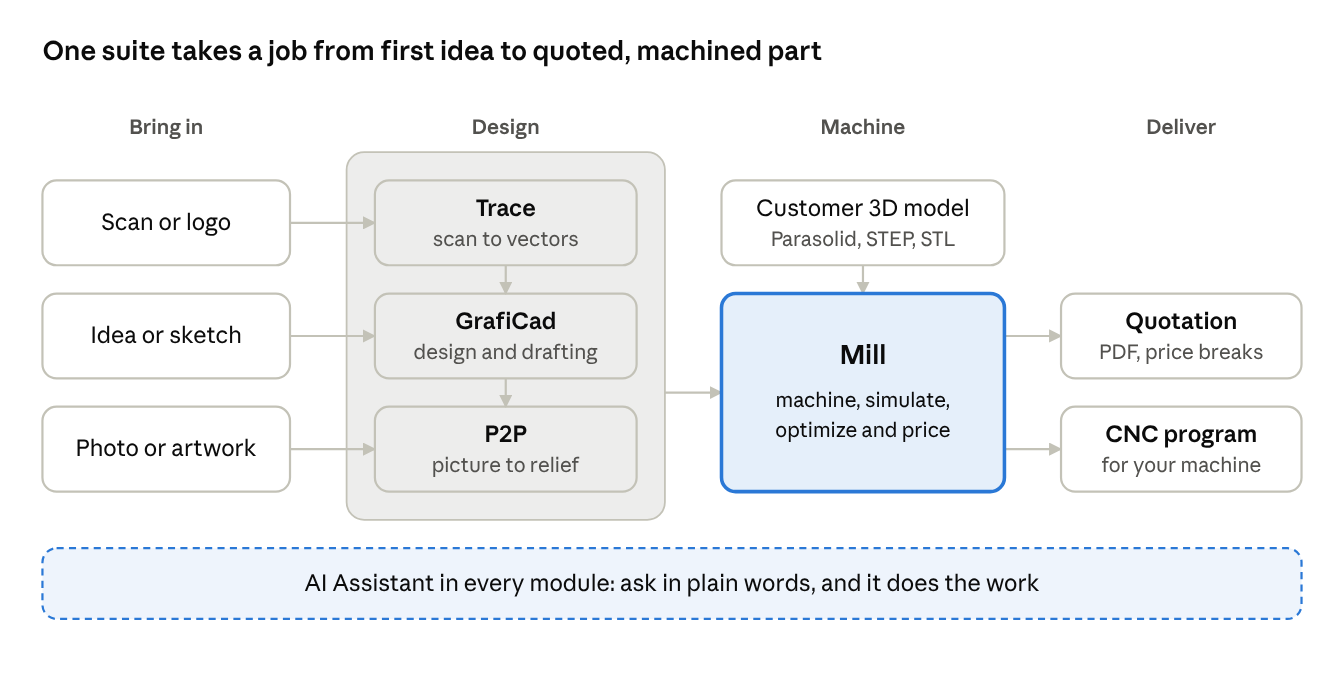
Whatever the job starts from, a scan, an idea, a photo or the customer's 3D model, it ends in Mill as a priced quotation and a program for the machine. The same assistant works in every module.
- GrafiCad. Draw a plate, holes and text in one sentence. Geometry is closed and ready to cut, and parts can be nested on the sheet.
- Mill. Parasolid, STEP, STL and DXF open on the stock. 2- to 5-axis milling, with the cut simulated before the program is sent.
- P2P. Flat artwork and photos become reliefs for signs, moulds and medals, then go straight to Mill.
- Trace. A scan becomes clean vectors: reduce the colours, remove the specks, trace the outline.
Cimagrafi 26 runs on current Windows and installs in minutes. Choose only the modules you need. Licensing is in software: activate online, or with a licence file where there is no internet. Drawings and jobs from earlier versions open as before.