


Nestor Studio 3.0 is a new front end for the same 2D and 3D nesting engines. The parts, the build and the parameters sit on one screen for each mode.
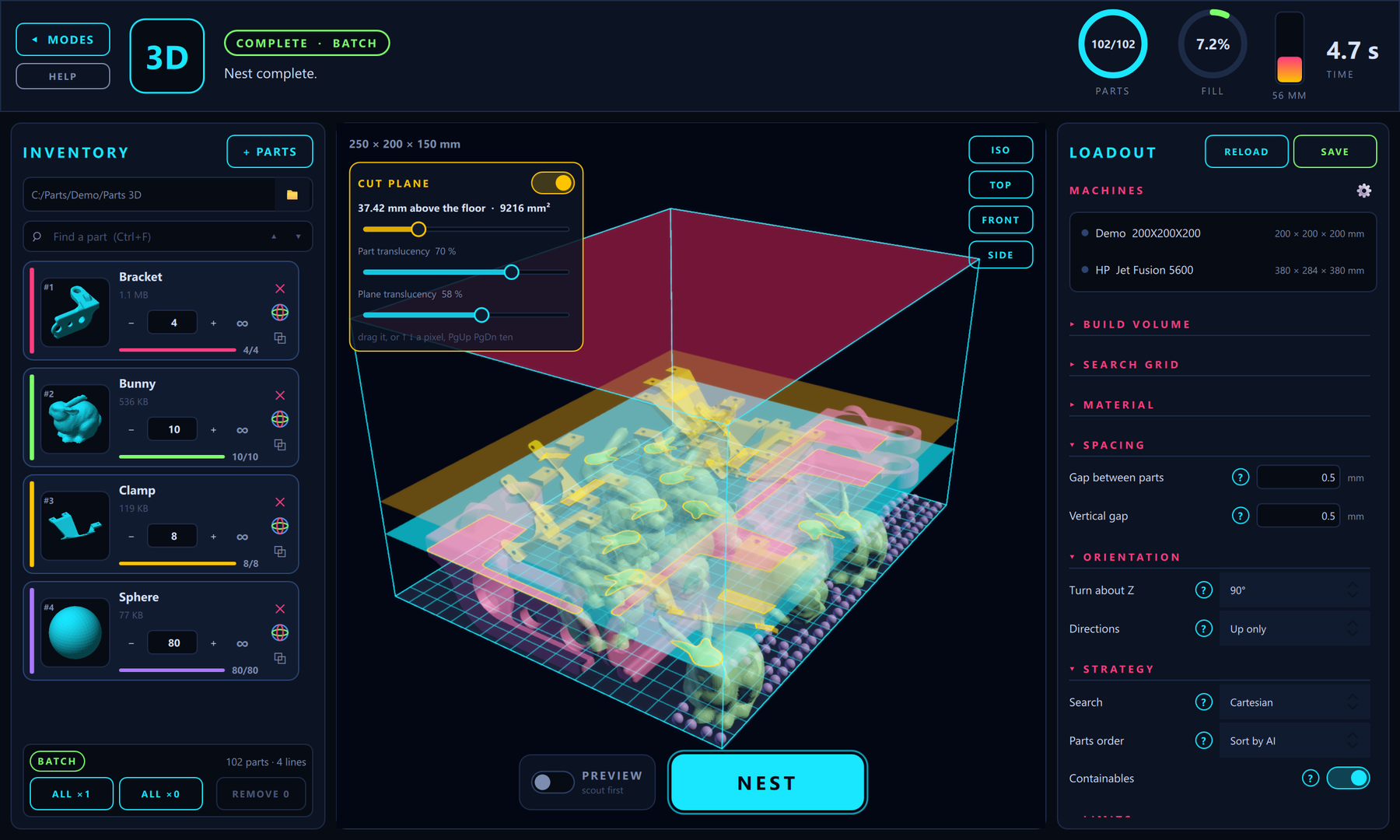
Drop part files or a folder into the inventory, set an amount or set a line to infinity, tune the sheet or the chamber, and press NEST. Parts appear as they are placed. When the nest ends, the debrief lists every line and opens the output folder.
- One workspace per mode. 2D sheets and 3D volumes. Fill and batch follow the inventory: a line set to infinity repeats until the room is full, and lines with amounts nest together.
- Orient in the build view. Seat a face, or use Auto flat, drag the rings, cut a section, and confirm. The same orienting covers 2D profiles.
- Cut plane. Slice the whole build at any height. Every part's section is filled in its own colour. The plane is for looking; the nest and the files stay as they are.
- Several Fill lines. With a balancing parts order, more than one part can be infinity, and they share the room by volume or by area.
- Margins from a part. In 2D, any outline in the inventory can become the sheet the nest is cut to.
- Machines. Keep each machine's table or chamber, resolution and shrinkage, and switch machine in one click.
The nesting itself is the engine of Nestor 2.3.1, now driven from Studio: Sort by AI, Balanced Volumes, Containables, Preview, and coupling. In 2D, Studio adds Balanced Areas, Sort by AI part orders, and coupling in a batch. A folder prepared in classic Nestor can be nested in Studio. Licensing is in software.
Read more on the Nestor product page, or contact us at shai@graphitech.net.
For 35 years, designers and machine shops have used Cimagrafi to turn ideas into finished parts. Version 26 brings design, relief modelling, tracing, machining and quoting together, with an AI assistant that works beside you.
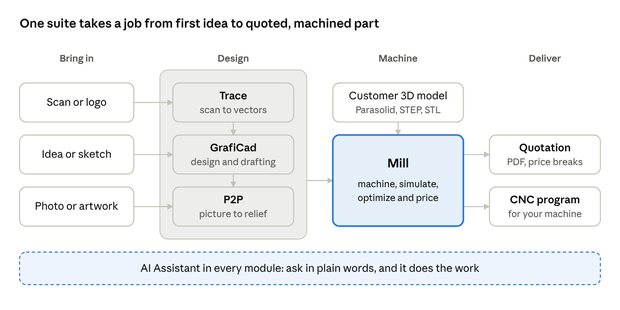
Whatever the job starts from — a scan, an idea, a photo or the customer’s 3D model — it ends in Mill as a priced quotation and a program for the machine.
Just ask
Every module has an AI Assistant docked beside the work. You describe the task in your own words, and it runs the same commands you would use, then shows the result on screen. One sentence replaces a string of menu clicks, and every change appears as it happens. A new user can ask Mill “Is this job ready to quote?” or “Quote 1, 10 and 50 parts,” and Trace can be told to reduce a picture to four colours, remove the specks and trace the outline.
GrafiCad — design that is ready to cut
GrafiCad is where parts, signs and artwork take shape. Lines, arcs, circles, polygons, holes and freehand sketches land on 14 snap modes. Text edits in any direction, for engraving and signs. Parts can be moved, rotated, scaled, mirrored, trimmed and offset, and nested automatically so more pieces come from every sheet. Drawings show as thumbnails in Windows Explorer.
Mill — machining, then a price
Mill turns drawings and 3D models into CNC programs for 2- to 5-axis milling. Parasolid and STEP solids, STL meshes and DXF drawings open in one step and sit on the stock. A solid or mesh can be sliced into levels and cut as 2½-axis contours. Spindle speed, feeds, depth and step-over are advised for the exact material, cutter and machine, and the feed rises and falls with the real load on the tool. Depths are checked against the stock, and the cut is simulated before the program is sent.
Mill prices the job from the toolpath it will actually cut: machine time from the path, material from the stock and your price list, tooling from tool price and tool life, and labour, overhead and margin from your shop rates. A quotation, with quantity price breaks and the customer’s currency, is written to a PDF. A price you have not entered is never counted as zero. Optimize Job compares faster ways to cut and keeps only the ones that still meet the finish. In one example, better feeds and speeds alone took an operation from about 20 minutes to just over 2, at the same surface finish.
P2P — from picture to part
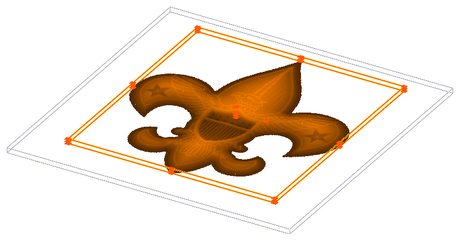
P2P turns flat artwork, photos and outlines into 3D reliefs for signs, plaques, moulds, medals and decorative panels. Outlines can be embossed, a photo can become relief depth, and backgrounds can be filled from a texture library. Several components combine into one model, and the finished relief goes straight to Mill.
Trace — from scan to clean vectors
Trace converts scanned drawings, logos and photos into smooth outlines for GrafiCad and Mill. It traces outlines and centrelines, fits lines and arcs instead of jagged pixel steps, and can reduce colours, pick a colour with a magic wand and remove specks before tracing.
On the PC you already have
Cimagrafi 26 runs on current Windows and installs in minutes — choose only the modules you need. Licensing is in software: activate online, or with a licence file where there is no internet. Drawings and jobs from earlier versions open as before.
Cimagrafi is developed by GraphiTech. Read more on the Cimagrafi product page, or contact us at shai@graphitech.net.